

Blazing WireGuard
Modern tunneling with kernel-grade performance. Connect in under a second.
Secure Paid VPN encrypts every packet with AES-256, routes it through dedicated exit nodes in 6 countries via WireGuard, OpenVPN, or IKEv2, and never keeps a single log. Stream globally, vanish on public Wi-Fi, and cover every device with one paid account.
Three battle-tested protocols, every modern security standard, zero compromise.
Modern tunneling with kernel-grade performance. Connect in under a second.

The same cipher trusted by governments and banks. Your traffic stays unreadable.

Dedicated exit nodes in 6 countries — stream geo-locked content, beat censorship, find the lowest latency.

We can't share what we never store. No browsing history, no IP logs, no metadata.

If the tunnel drops, traffic stops. Your real IP never leaks, not even for a second.
No setup, no configuration files, no learning curve.
 1
1
Pick a plan. Enter your email. That's the whole signup. No phone number, no paperwork.
 2
2
App Store, Play Store, or direct download. The app weighs under 25 MB and installs in seconds on every platform.
 3
3
Choose a country and you're protected. Switch locations any time. The kill switch fires the second something drops.
No router flashing, no config files, no terminal. The apps handle key generation, protocol selection, and DNS automatically — and if you ever do get stuck, support is answered by the engineers who run the servers, typically within hours.
A VPN (virtual private network) is an encrypted connection between your device and a server run by a VPN provider. All of your internet traffic travels inside that encrypted tunnel, so the networks it crosses — your ISP, a hotel's Wi-Fi, an airport hotspot — can't read it, and the websites you visit see the VPN server's IP address instead of yours.
In practice that means three things: your browsing stays private from whoever runs the network you're on, your real IP address and location are hidden from the sites and apps you use, and services that pick their catalog or pricing based on your location see the country you chose instead. That's the entire product — everything else is execution: how fast the tunnel is, how many locations you can exit from, and whether the provider keeps records of what you did (we don't). The technology itself is decades old and battle-tested — what you're choosing between providers is speed, honesty, and price, not fundamentally different machinery.
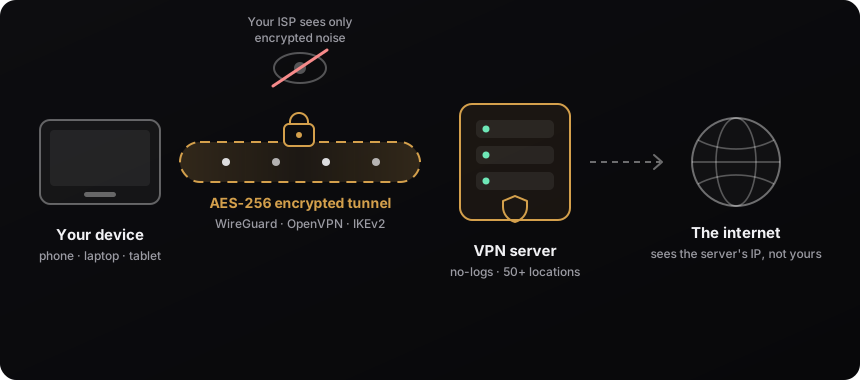
When you tap Connect, the app and the server agree on encryption keys and open a tunnel using one of three protocols — WireGuard (fastest), OpenVPN (gets through restrictive firewalls on TCP port 443), or IKEv2 (seamlessly survives switching between Wi-Fi and mobile data). Every packet your device sends is encrypted with AES-256 or ChaCha20 before it touches the network, carried to the VPN server, decrypted there, and sent on to its destination. Replies come back through the same tunnel. Your ISP sees a single encrypted stream to one server — not the sites you visit, not your DNS lookups, nothing. Curious which protocol to pick? Read our protocol comparison with real fleet benchmarks.
| Situation | Best protocol | Why |
|---|---|---|
| Home or office, maximum speed | WireGuard | Single-round-trip handshake, kernel-level performance — typically saturates a gigabit line |
| Phone that hops Wi-Fi ↔ mobile data | IKEv2 | MOBIKE migrates the tunnel between networks without dropping — calls and downloads survive the switch |
| Hotel, airport, office guest Wi-Fi | OpenVPN TCP 443 | Looks like ordinary HTTPS, so it passes firewalls that silently drop everything else |
| Long downloads on a normal network | WireGuard or OpenVPN UDP | UDP transport avoids the TCP-over-TCP slowdown on lossy links |
You don't have to memorize this — the Secure Paid VPN apps default to the right protocol for your platform and let you switch in one tap when a network misbehaves. All three protocols are included on every plan, on every server. If you're curious about the trade-offs in depth, we've written them up with real numbers from our own fleet: WireGuard vs OpenVPN vs IKEv2 and OpenVPN TCP vs UDP.

Every tunnel uses AES-256-GCM (OpenVPN and IKEv2) or ChaCha20-Poly1305 (WireGuard) — the same ciphers protecting online banking and government traffic. Keys are negotiated with perfect forward secrecy, so even if a key were ever compromised, past sessions stay unreadable.
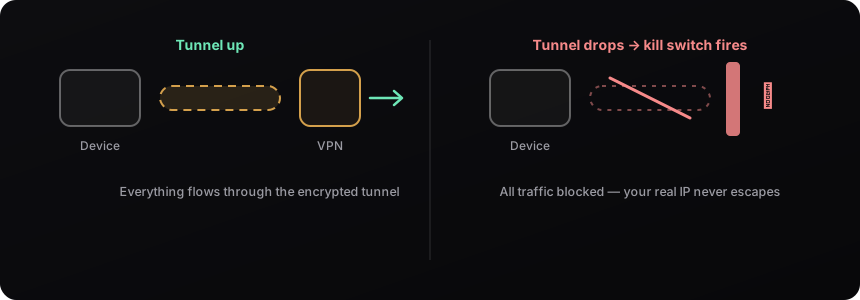
Encryption is only half the job; the other half is making sure nothing sneaks around the tunnel. Our apps push tunnel-internal DNS on every protocol so your lookups can't leak to your ISP, and the kill switch blocks all traffic the instant the tunnel drops — your real IP never escapes, not even for the second it takes to reconnect. You can test both claims yourself right now with our free DNS leak test and WebRTC leak test — no account needed.
And the part most VPNs only put in marketing copy, we put in the daemon configuration: logging is disabled at the daemon level on every exit node — the OpenVPN status files, WireGuard peer dumps, and proxy access logs are all off. There is no browsing history, no source-IP record, no per-user timestamp to seize, subpoena, or leak, because the files never exist. That's what no-logs actually means, and it's the entire reason a VPN is worth paying for.
A taste of where you can route your traffic right now.

Encryption is open-source — AES-256 costs a provider the same whether they charge $12.99 or $100 a year. Here's what actually differs.
| Secure Paid VPN | Typical premium brand | |
|---|---|---|
| Yearly price | $12.99 — renews at $12.99 | $60–100+ after the first-year promo |
| Protocols | WireGuard, OpenVPN UDP/TCP, IKEv2 | WireGuard (often rebranded), OpenVPN |
| Encryption | AES-256 + ChaCha20-Poly1305 | AES-256 + ChaCha20-Poly1305 — identical |
| Speed tiers | Full speed on every plan | Full speed on every plan |
| No-logs policy | Yes — enforced at the daemon level | Yes |
| Kill switch & leak-safe DNS | Included | Included |
| Server fleet | Dedicated nodes in the countries people actually use | Thousands of servers, many virtual locations |
| Bundled extras | None — it's a VPN, priced like one | Antivirus, password manager, storage upsells |
Honest caveat: if you need an IP in one of 100 countries or device-mesh extras, a big brand earns its price. If you need fast, private, no-logs browsing — the core product is the same, minus the marketing budget. The renewal price is the number to compare: promotional first-year rates roughly double or triple at renewal across the industry, while $12.99 here stays $12.99. Over three years that is about $39 against $240 or more — for the same ciphers, the same protocols, and the same no-logs promise.

Running VPN servers costs real money — bandwidth, hardware, and maintenance. When a VPN is free, that money comes from somewhere else, and the somewhere else is usually you: browsing data sold to brokers, ads injected into pages, throttled speeds designed to upsell, or in the worst documented cases, your idle connection resold as an exit point for strangers' traffic.
| Typical free VPN | Secure Paid VPN ($1.08/mo) | |
|---|---|---|
| Business model | Your data, ads, or your bandwidth | Your $12.99/year — that's it |
| Speed | Throttled, crowded free servers | Full speed, dedicated nodes |
| Data caps | 500 MB – 10 GB/month common | Unlimited |
| Logging | Often extensive (read the policy) | None — disabled at the daemon |
| Streaming | Rarely works | Supported on marked locations |
There are honest free trials, but an honest free trial is a demo, not a product. If a service offers unlimited free VPN forever, the product being sold is you. We wrote a longer breakdown in what a safe cheap VPN looks like in 2026.
| VPN | Proxy | Tor | |
|---|---|---|---|
| What it covers | Every app on the device | One app or browser only | Tor Browser traffic only |
| Encryption | Full, device-to-server | Usually none (HTTP) or browser-only | Triple-layered, by design |
| Speed | Near line speed | Fast but unprotected | Slow — traffic hops 3 relays |
| Streaming & downloads | Yes | Sometimes | Impractical |
| Best for | Everyday privacy on everything | Quick IP swap in one tab | Maximum anonymity, high-risk use |

The short version: a proxy changes your visible IP for one application but usually encrypts nothing — fine for a quick regional check, useless as protection. A VPN encrypts everything every app on your device sends, at nearly full speed, which makes it the right default for daily life. Tor routes your browser through three volunteer relays for the strongest anonymity available, at the cost of speed that makes streaming or large downloads impractical. They compose, too: plenty of our users run Tor Browser through the VPN so their ISP can't even see they're using Tor. Our browser extensions are, technically, smart proxies backed by the same authenticated exit fleet — the best of both.
| Price | $5.99/month, or $12.99/year ($1.08/month) |
| Money-back guarantee | 7 days, every plan |
| Protocols | WireGuard · OpenVPN UDP & TCP · IKEv2/IPSec |
| Encryption | AES-256 (OpenVPN/IKEv2) · ChaCha20-Poly1305 (WireGuard) |
| Logging | None — no browsing history, IPs, timestamps, or bandwidth records |
| Locations | 6+ countries, 6+ dedicated servers — full list |
| Apps | iOS · Android · macOS · Chrome · Firefox · Edge (Windows & Linux coming) |
| Devices per account | 5 simultaneous |
| Streaming & P2P | Supported on marked locations, no speed caps |
Cancel any time. Money-back guarantee on every plan.
The moments a VPN stops being abstract and starts earning its $1.08.


Cafés, airports, and hotels are the easiest places to snoop traffic. The tunnel makes their network irrelevant — everything is encrypted before it leaves your device. Rogue hotspots with trustworthy names are the classic trap — with the tunnel up, even a malicious network learns nothing.

Keep access to the catalogs and accounts you already pay for when you're abroad — connect to a server back home and everything works like you never left. Your watchlist, your language settings, your saved progress — all exactly where they should be.

Foreign IPs trip fraud alerts and lock accounts. Exit from your home country and your bank sees a normal login instead of a red flag. No frozen cards at midnight, no verification calls across time zones, no locked accounts on day one of a trip.

Dodge targeted DDoS on your home connection, join region-locked servers, and sidestep ISP throttling that kicks in on game downloads. WireGuard adds so little latency that on many routes the optimized path is actually faster than the direct one.

Client data on hotel Wi-Fi is a liability. An always-on tunnel is the cheapest security policy a freelancer can buy. Set it to connect automatically on untrusted networks and forget it exists.

Flights, hotels, and subscriptions quietly price by location. Compare from another country and see what the same cart costs elsewhere. Two minutes of location-hopping has paid for a year of VPN more times than we can count.

"Is the VPN fast?" is really four questions: how far is the server, which protocol are you on, how loaded is the node, and how good is its peering. Marketing can't change any of them — physics and provisioning can.
Distance sets your latency floor: light in fiber covers roughly 100 km per millisecond round-trip, so a server 6,000 km away can never answer in under ~60 ms no matter whose logo is on it. Pick the nearest exit that does the job. Protocol is the biggest lever you control: WireGuard routinely delivers 30–60% more throughput than OpenVPN on identical hardware, which is why it's our default. Server load is why "5,000 servers" can still feel slow — an oversold node with a thousand users shares one uplink; our compact fleet is provisioned so dedicated nodes stay comfortably under capacity, and the app shows live load per location. Peering is the invisible one: an exit that hands traffic directly to major carriers beats one that bounces through three transit networks — it's why we build on well-connected facilities rather than the cheapest rack available.
The honest expectation: on a nearby server with WireGuard, most home connections measure within a few percent of their normal speed — often indistinguishable. Test it yourself during the guarantee window with a large real download, not just a speed-test site.

"I have nothing to hide" usually means "I haven't seen the logs." Here is what different parties can observe about an unprotected connection — none of it hypothetical, all of it routine.
Your ISP sees every domain you visit and when, via your DNS lookups and connection metadata — and in many countries it must retain that history for months or years, and may legally sell aggregated forms of it to advertisers. The operator of any Wi-Fi network you join — the café, the hotel, the airport, whoever set up the router — sees the same, plus device names and unencrypted traffic. Websites and ad networks see your IP, from which they read your location and ISP, and use it as a durable identifier to stitch your visits together across the web, incognito or not. On shared networks, tools that sniff unencrypted traffic are point-and-click; a malicious hotspot with a familiar name ("Airport_Free_WiFi") costs nothing to run.
A VPN doesn't make you invisible — you still log into your accounts, and your browser still has a fingerprint. What it does is remove the two biggest, laziest observers: the network you're standing on and the ISP that carries you. The tunnel turns everything they could read into noise, and the exit swaps the identifier they all key on. Check what your connection exposes right now with our IP checker — it takes ten seconds.
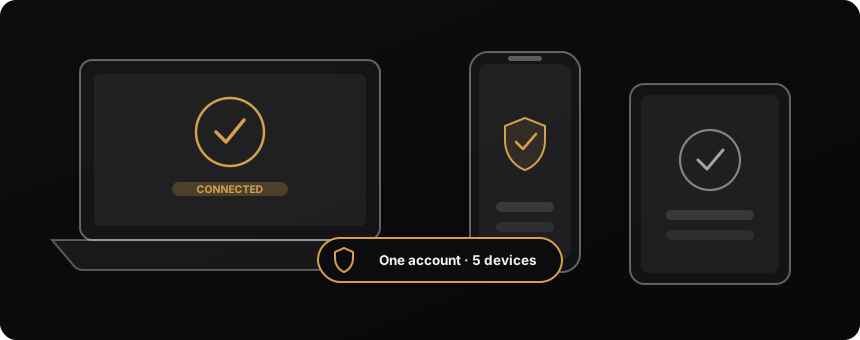
Native apps for iPhone, iPad, Android, and macOS, plus extensions for Chrome, Firefox, and Edge. Sign in once — up to 5 devices connect simultaneously. Start a plan on your phone and it works on your laptop before you’ve closed the checkout tab; there are no per-platform upgrades or “premium device” tiers.

Streaming services decide what you can watch by looking at your IP address. Travel abroad and the catalog you pay for shrinks or disappears; some platforms block foreign IPs outright. Connect to a Secure Paid VPN server back home and you look local again — your shows, your account, your saved progress, exactly as you left them.
Streaming-ready locations are marked in the app, there are no speed caps on any plan, and WireGuard comfortably carries 4K. It works the other way too: connect to our US or UK exits to check catalogs from those markets while you travel. One honest note most VPNs skip: platforms and VPNs play cat-and-mouse, so a specific service can be temporarily blocked on a specific node — when that happens, switching locations usually solves it, and our support answers fast when it doesn't.
Sports are the underrated use case: regional blackouts and country-exclusive broadcast rights mean the match you want is often streaming legally and free somewhere — just not where you're standing. A server in the right country turns "not available in your region" into a working stream, on the subscription you already pay for.
Every VPN homepage says fast, secure, and private — including this one. Don't take any provider's word for it, ours included. Here is the checklist we'd use to evaluate any VPN, with the honest answer for how we score on each point.
Run any competitor through the same seven questions — genuinely, we encourage it. The good ones pass. The difference is what they charge you for passing.

In the overwhelming majority of countries, yes — completely. VPNs are standard corporate infrastructure; every remote worker connecting to an office uses one. Banks require them, governments deploy them, and using one as a private individual is as legal as using HTTPS.
A small number of countries restrict or license VPN use, and a few ban unapproved providers outright — if you're traveling somewhere with heavy internet controls, check the local rules first. And everywhere on earth, the obvious rule applies: things that are illegal without a VPN remain illegal with one. A VPN protects your privacy; it is not a license. For day-to-day life — public Wi-Fi, streaming, keeping your ISP out of your browsing history — you are firmly in normal, legal territory. If VPNs were suspect, every corporation, bank, and government on earth would be a suspect too.

Engineers, not a marketing department. We build and operate the entire stack ourselves — the apps on every platform, the backend, and every exit node in the fleet. Nothing is white-labeled, resold, or rented from a "VPN infrastructure provider."
That matters for two reasons. First, accountability: when we say logging is disabled at the daemon level, that's a configuration we wrote and can stand behind, not a promise relayed from a subcontractor. Second, speed of repair: the people answering support are the people with root on the servers, so problems get fixed in hours, not ticket-escalation weeks. We publish what we know on the blog — real configs, real benchmarks, real production war stories — because showing our work is the only honest way a small provider earns trust against brands with hundred-million-dollar ad budgets.
Free tools that run in your browser, and guides written by the team that runs the fleet.
It makes you private, which is different. The accounts you log into still know who you are, and your browser still carries a fingerprint. Anonymity is a discipline; a VPN is one tool in it — anyone selling an invisibility cloak is overpromising.
Server count is a marketing number. What you feel is the load and peering of the one server you're on. A thousand oversold virtual instances lose to a handful of well-provisioned dedicated nodes — and many mega-fleet "locations" are virtual anyway.
The largest users of VPN technology on earth are corporations protecting payroll data on hotel Wi-Fi. The same protection applied to your banking, medical searches, and your kids' devices isn't suspicious — it's hygiene.
The encryption in a $100/year VPN and a $12.99/year VPN is the same open-source code, reviewed by the same public community. Price differences buy marketing reach and bundled extras — never a stronger cipher.
On a modern protocol and a nearby server the overhead is single-digit percent — and because the tunnel stops your ISP from classifying traffic, throttled services sometimes get faster. The slow-VPN reputation comes from crowded free servers and decade-old protocols.
The pattern behind all five: VPN marketing sells magic, but the product is plumbing — good pipes, honestly run. Judge any provider, including us, on the three things that are checkable: the protocols it ships, the mechanism behind its no-logs claim, and the price it renews at. Everything else on a VPN homepage is decoration.
The vocabulary you'll meet on every VPN site — including this one — defined without the jargon, so you know exactly what you're buying.
$5.99 per month, or $12.99 per year (about $1.08/month). Every plan includes all protocols, all locations, and full speed, with a 7-day money-back guarantee — and the renewal price is the same as the first-year price. See plans.
No. Logging is disabled at the daemon level on every exit node — no browsing history, DNS queries, source IPs, timestamps, or bandwidth records exist. Read what no-logs really means and our privacy policy.
WireGuard (fastest), OpenVPN UDP and TCP (TCP 443 gets through restrictive firewalls), and IKEv2/IPSec (best on phones). All three on every plan — here's how to choose.
With WireGuard on a nearby server, most people measure little to no difference — encryption overhead is a few percent on modern hardware. Distant servers add latency because of physics, not the VPN itself: light in fiber simply takes time. Full breakdown in the speed section above.
In most countries, yes — VPNs are ordinary consumer and business tools used for security and privacy. A small number of countries restrict or license VPN use; check local rules if you travel there. Illegal activity stays illegal with or without a VPN.
Five simultaneously, on one account: iOS, Android, macOS, and the Chrome, Firefox, and Edge extensions. That covers a phone, a laptop, a tablet, and two browsers with room to spare — enough for most households. Get the apps.
Yes — streaming-ready locations are marked in the app and no plan has speed caps. Connect to the country whose catalog you want and stream normally; WireGuard carries 4K comfortably on a decent connection. If a platform blocks one node, switching locations usually fixes it immediately.
Every plan has a 7-day money-back guarantee, and you can cancel any time from the dashboard — your access runs to the end of the paid period either way.
Incognito only stops your own browser from saving history and cookies — your ISP, the network you're on, and every website still see your traffic and real IP. A VPN encrypts the traffic itself and swaps your IP. Different problems; they work fine together.
Your ISP sees one encrypted stream to one server and how much data moves — nothing else. The sites you visit, your DNS lookups, and the content all travel inside the tunnel where the ISP can't read them. This is also why VPNs defeat ISP-level content throttling: the ISP can't slow down what it can't classify.
Because $12.99/year is what a VPN costs to run when you don't pay YouTubers to recommend it. No affiliate commissions, no ad budget, a compact dedicated fleet in the countries people actually use — and the same open-source ciphers the $100/year brands run. Full breakdown here.
Usually. Networks that drop WireGuard's UDP almost always pass OpenVPN TCP on port 443, because it's indistinguishable from ordinary HTTPS traffic. Switching protocols is one tap in the app, and it remembers what worked on each network.
Yes — on the locations marked P2P in the app, with no bandwidth caps and nothing logged about what you transfer. WireGuard gives the best sustained throughput for large transfers.
No — and we'd rather say so than sell you a checkbox. A VPN encrypts traffic and hides your IP; it doesn't scan files or block malware. Use your platform's built-in protections alongside it.
An email for your account, a payment record with the payment processor, and aggregate per-server load metrics. No browsing activity, no connection history, no per-user bandwidth records — the daemons are configured not to write them. Details in the privacy policy.
Sign up, install on your phone, tap connect. That's it.